Integrations
Before integrating, see Mint Recursive → Service Pricing for the scope of Training API, Inference API, and LLM as a judge. Model unit prices remain in the dashboard's Models & Pricing.
The Macaron hosted model API is OpenAI-compatible, so any client that speaks /v1/chat/completions works. This page covers the six integration paths exposed by the dashboard, each with a copy-ready snippet. Replace the placeholders:
<MACARON_API_KEY>— your dashboard API key (see Authentication)<BASE_URL>—https://mint.macaron.im(outside Mainland China) orhttps://mintcn.macaron.xin(Mainland China)<MODEL>— a model ID from Models, e.g.macaron-v1-venti
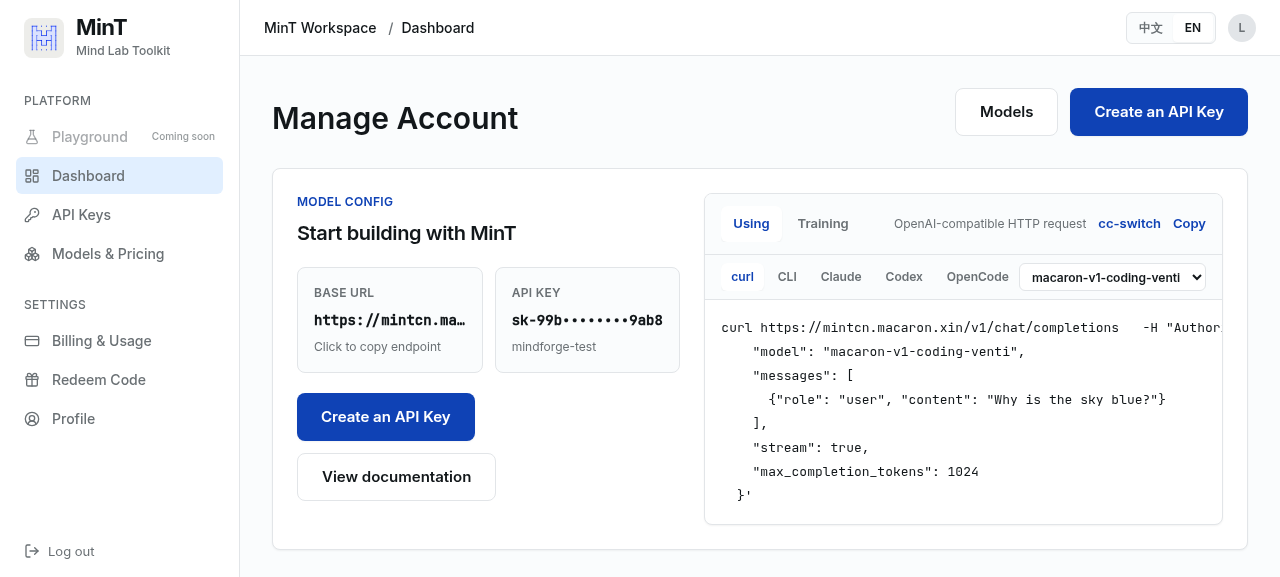
curl
curl <BASE_URL>/v1/chat/completions \
  -H "Authorization: Bearer <MACARON_API_KEY>" \
  -H "Content-Type: application/json" \
  -d '{
    "model": "<MODEL>",
    "messages": [
      {"role": "user", "content": "Why is the sky blue?"}
    ],
    "stream": true,
    "max_completion_tokens": 1024
  }'
Mint Recursive SDK (training)
For training and RL loops against the hosted endpoint, install the Mint Recursive SDK and point it at the hosted API:
pip install git+https://github.com/MindLab-Research/mindlab-toolkit.git
export MINT_API_KEY=<MACARON_API_KEY>
export MINT_BASE_URL=<BASE_URL>
Claude Code
Claude Code reads its endpoint and model from environment variables. Set them
before launching claude.
macOS / Linux / WSL:
# Install Claude Code (skip if already installed)
curl -fsSL https://claude.ai/install.sh | bash

# Configure Macaron
export ANTHROPIC_BASE_URL="<BASE_URL>"
export ANTHROPIC_AUTH_TOKEN="<MACARON_API_KEY>"
export ANTHROPIC_MODEL="<MODEL>"
export CLAUDE_CODE_SUBAGENT_MODEL="<MODEL>"
export ANTHROPIC_DEFAULT_HAIKU_MODEL="<MODEL>"
export ANTHROPIC_DEFAULT_SONNET_MODEL="<MODEL>"
export ANTHROPIC_DEFAULT_OPUS_MODEL="<MODEL>"
export CLAUDE_CODE_DISABLE_NONESSENTIAL_TRAFFIC="1"
export _CLAUDE_CODE_ASSUME_FIRST_PARTY_BASE_URL="1"
export CLAUDE_CODE_USE_POWERSHELL_TOOL="true"
export IS_SANDBOX="1"
export CLAUDE_CODE_ATTRIBUTION_HEADER="0"
export CLAUDE_CODE_DISABLE_GIT_INSTRUCTIONS="1"

# Launch
claude
Windows PowerShell:
# Install Claude Code
irm https://claude.ai/install.ps1 | iex

# Configure Macaron
$env:ANTHROPIC_BASE_URL="<BASE_URL>"
$env:ANTHROPIC_AUTH_TOKEN="<MACARON_API_KEY>"
$env:ANTHROPIC_MODEL="<MODEL>"
$env:CLAUDE_CODE_SUBAGENT_MODEL="<MODEL>"
$env:ANTHROPIC_DEFAULT_HAIKU_MODEL="<MODEL>"
$env:ANTHROPIC_DEFAULT_SONNET_MODEL="<MODEL>"
$env:ANTHROPIC_DEFAULT_OPUS_MODEL="<MODEL>"
$env:CLAUDE_CODE_DISABLE_NONESSENTIAL_TRAFFIC="1"
$env:_CLAUDE_CODE_ASSUME_FIRST_PARTY_BASE_URL="1"
$env:CLAUDE_CODE_USE_POWERSHELL_TOOL="true"
$env:IS_SANDBOX="1"
$env:CLAUDE_CODE_ATTRIBUTION_HEADER="0"
$env:CLAUDE_CODE_DISABLE_GIT_INSTRUCTIONS="1"

# Launch
claude
Note
Shell environment variables take precedence over ~/.claude/settings.json. If old ANTHROPIC_* values exist in an rc file, they will override the config above. Check first:
grep -nE 'ANTHROPIC_|CLAUDE_CODE_SUBAGENT_MODEL' ~/.zshrc ~/.bashrc ~/.bash_profile ~/.profile 2>/dev/null
Comment out any matches, then source the file or reopen the terminal.
Alternatively, merge the keys into the env block of ~/.claude/settings.json, preserving any existing config:
{
  "env": {
    "ANTHROPIC_BASE_URL": "<BASE_URL>",
    "ANTHROPIC_AUTH_TOKEN": "<MACARON_API_KEY>",
    "ANTHROPIC_MODEL": "<MODEL>",
    "CLAUDE_CODE_SUBAGENT_MODEL": "<MODEL>",
    "CLAUDE_CODE_DISABLE_NONESSENTIAL_TRAFFIC": "1",
    "_CLAUDE_CODE_ASSUME_FIRST_PARTY_BASE_URL": "1",
    "CLAUDE_CODE_USE_POWERSHELL_TOOL": "true",
    "IS_SANDBOX": "1",
    "CLAUDE_CODE_ATTRIBUTION_HEADER": "0",
    "CLAUDE_CODE_DISABLE_GIT_INSTRUCTIONS": "1",
    "ANTHROPIC_DEFAULT_HAIKU_MODEL": "<MODEL>",
    "ANTHROPIC_DEFAULT_OPUS_MODEL": "<MODEL>",
    "ANTHROPIC_DEFAULT_SONNET_MODEL": "<MODEL>"
  },
  "model": "<MODEL>"
}
Run claude and verify with /status that the main and subagent models are
both <MODEL>.
Codex
Install Codex if needed, then update the user-level config file
(~/.codex/config.toml on macOS/Linux, %USERPROFILE%\.codex\config.toml on
Windows). Keep existing config and add:
model = "<MODEL>"
model_provider = "macaron"

[model_providers.macaron]
name = "Macaron"
base_url = "<BASE_URL>"
wire_api = "responses"
experimental_bearer_token = "<MACARON_API_KEY>"
Run codex and verify the model and provider with /status.
OpenCode
Install OpenCode if needed, then update the global config at
~/.config/opencode/opencode.json. Keep existing config and add:
{
  "$schema": "https://opencode.ai/config.json",
  "model": "macaron/<MODEL>",
  "provider": {
    "macaron": {
      "npm": "@ai-sdk/openai",
      "name": "Macaron",
      "options": {
        "baseURL": "<BASE_URL>/v1",
        "apiKey": "<MACARON_API_KEY>"
      },
      "models": {
        "<MODEL>": {
          "name": "Macaron V1"
        }
      }
    }
  }
}
Run opencode and use /models to confirm the default model is
macaron/<MODEL>. Do not write this config into a project directory or commit
it to Git.
ccswitch
ccswitch imports a provider configuration via a protocol URL. Open this URL in a browser (or have ccswitch handle it) to register the Macaron provider:
ccswitch://v1/import?resource=provider&app=claude&name=Macaron-V1&endpoint=<BASE_URL>&apiKey=<MACARON_API_KEY>&model=<MODEL>
The app parameter selects the target client (claude, codex, or
opencode); ccswitch writes the corresponding config for that client.
Self-hosted surface
The integrations above target the hosted Macaron API over /v1/chat/completions. If you are self-hosting Mint Recursive and serving Qwen3 base models, the /oai/api/v1 surface for that case is documented under Mint Recursive → opensource.